Hello there, fellow Vocadian! I’m happy to see you here
In this guide, let’s learn how to use custom variables in Vocads and how you can collect custom variable information from your CRM to Vocads easily!
What are custom variables?
Custom variables are global variables in your CRM that store information. Using these, you can replace key values, such as usernames and brands, in various CRM tools, allowing customers to receive personalized email campaigns.
Since our previous update, you can now add custom variables in your voice campaign in Vocads to create personalized campaigns.
How do I use variables in Vocads?
To use custom variables in Vocads, there are two places you need to pay attention to.
- The studio in which you’re creating your campaign
- The link you used to create your campaign.
Let’s go and see how it’s done.
- Studio
- Create a campaign with a link you wish to put the campaign in.
- Once you enter the studio, take any element you wish to put custom variables in (for example, let’s use the message element)
- In the element, you could write a message like this. This is just an example.
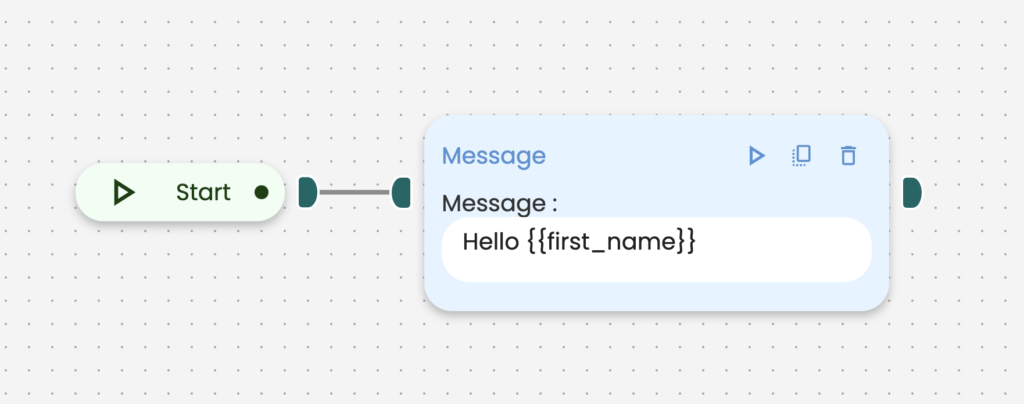
NOTE: All custom variables are case-sensitive. So it wouldn’t work if you have typed {firstname} instead of {{first_name}}
And that’s it in the studio. Let’s go and check what to do with your link.
- Link
- Take the link and add this slug at the end of your link. For example
www.<YOUR LINK>.com/?v_first_name=Tim&v_age=50
- Notice ?v_first_name & v_age, These are the custom variables that you had assigned in the elements in your campaign (see here)
- Every variable you’re assigning in a campaign should be present in the link where the campaign is to be published.
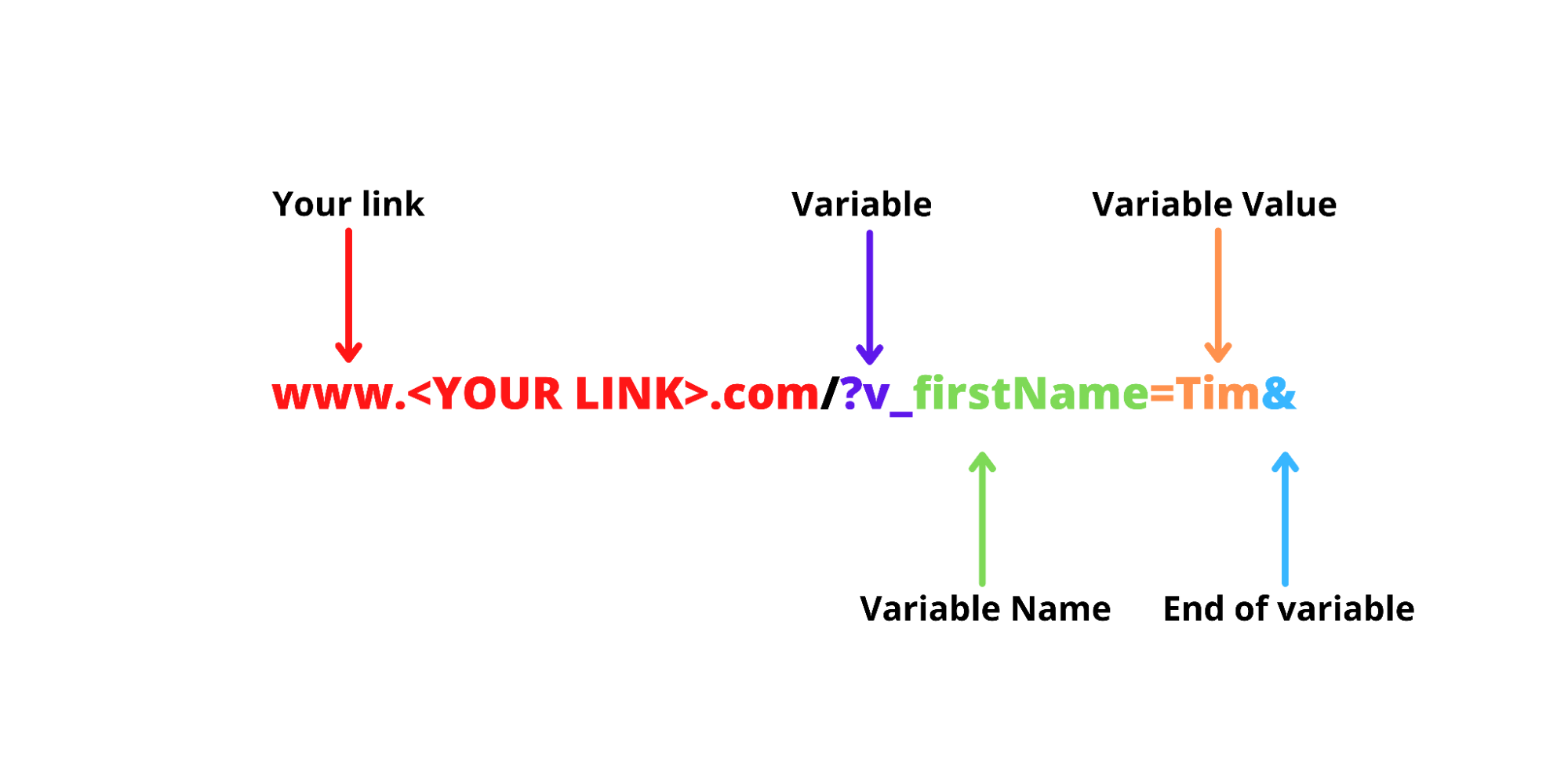
- To begin defining variables, start with putting “?” only before writing the first variable.
- In the link, each variable is mentioned as “v_” where the custom variable is mentioned next to it and the value assigned to the variable is mentioned with an “=”.
- To add more variables, just add an “&” at your link after typing the first custom variables.
- Then click “update campaign” to save your changes, copy-paste the new link into your browser, and voila!
To help yourself understand more, here is an image breakdown of the link.
And that’s it! We’re done!
How do I implement CRM variable data to Vocads?
You can now import variable data from your CRM tools to Vocads, which would help personalize your voice campaigns each time a customer clicks on the page!
Let’s see how it can be done
- Click “Configuration” on the bottom left corner of your editor in your campaign (pic)
- Take the link and add this slug at the end of your link. For example
?v_firstName={firstname}&v_age={age}
- Same as before, add the variables at the end of your link and the values you assign to these must come from your CRM tools.
- For example – If a CRM tool has a custom variable for the first name and it looked like {$firstname}, the value for the custom variable should be written exactly as it is. It would look like this. (pic)
www.<YOUR LINK>.com/?v_firstName={$firstname}
- Then click “update campaign” to save your changes, copy-paste the new link into your browser, and voila!
And there you have it! This is how to use custom variables in Vocads!
If you have any questions, don’t hesitate to contact us!